RDash - Quickstart Guide
RDash is a recommendation system that captures the opportunities for pursuing external research funds through grants, contracts, and subcontracts based on the scholar’s research profile. RDash-Grants entails analyzing a massive set of solicitations and funding opportunities and selecting the most appropriate one or group of relevant grants by considering the scholar’s preferences and research profile.
- RDash consists of two main components :
A webapp (frontend)
Backend
This page will provide details on the backend component of RDash which uses Natural Language Processing for recommendation.
Setup
Before using the code you should first clone the repository (currently available only to Taugroup members) and install all the required libraries. This can be done through the below snippet from your command line.
git clone https://github.com/taugroup/RDASH.git
pip install -r requirements.txt
Usage
End-to-end recommendation system can be broken down to 7 steps. Each of the steps and their corresponding code are given below.
Step 1 : Create a list of Scholars (with demographic details and list of publications)
python user_profile_creation.py --univ_name='TAMU'
Step 2 : Create publication database - extract the information from all publications of each user
python extract_publications.py --n_cores=20
Step 3 : Create Analytical database - with representative keywords for each user
python create_analytical_data.py --n_cores=20
Step 4 : Compile list of Grants
python extract_proposals.py
Step 5 : Extract grant details
python main_extractor.py --n_cores=20 --a 'National Science Foundation' 'National Institutes of Health'
Step 6 : Recommend scholars for a Proposal / grant
python recommend_scholars.py --top_k=20 --proposal_id='PD-18-1263' --n_cores=20 --agency='NSF'
Step 7 : Extract proposals to a json for searching
python extract_proposals_titles_db.py
Features
The tool extracts and creates user/scholar profile using the TAMU scholars library using APIs
Matches and recommends user profile to research proposals
Identify similar research profiles for each scholar
Advance Oppurtunities for Intelligent Research
Recommend latest relevant articles/publications for literature searcha and advancement
Workflow
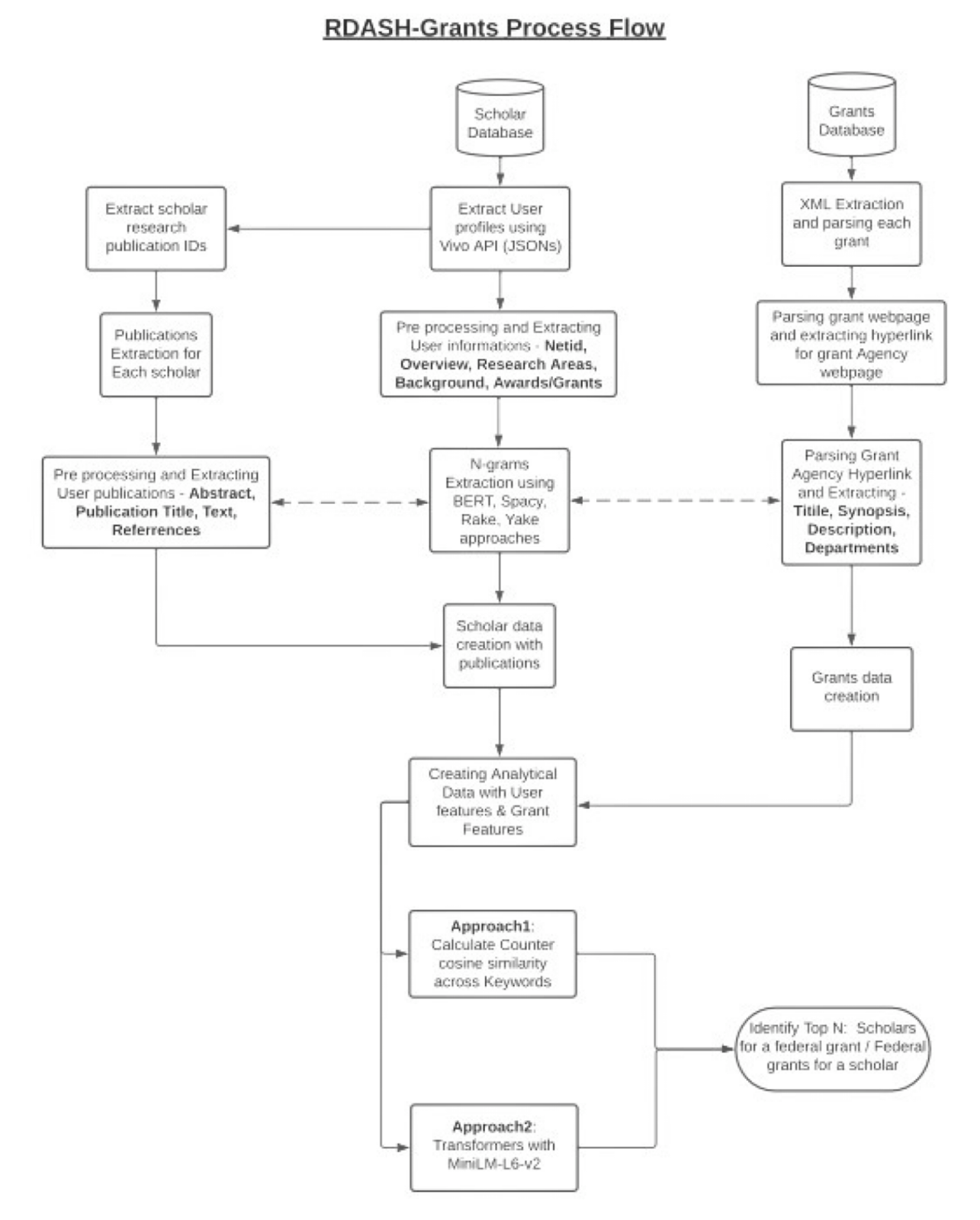
Modules
Below is the documentation for various python modules used in this project.
Automatic_keyword_generator
- class automatic_keyword_generator.Keyword_generator(text)[source]
Bases:
objectClass containing various algorithms to generate keywords. Algorithms include Yake, Gensim, Rake, Bert, Spacy.
- BERT(n_gram=1, top_n=5)[source]
Function containing BERT algorithm to extract keywords
- Parameters
n_gram (int) – No of continuous sequence of words to be used
top_n (int) – Ordered on relevancy, the number of top keywords to be returned
- Returns
List of extracted keywords
- Return type
List
- Rake()[source]
Function containing RAKE algorithm to extract keywords
- Parameters
None –
- Returns
List of extracted keywords
- Return type
List
- Spacy()[source]
Function containing Spacy algorithm to extract keywords
- Parameters
None –
- Returns
List of extracted keywords
- Return type
List
- Yake(max_ngram_size, numOfKeywords, language='en', deduplication_threshold=0.9)[source]
Function containing YAKE algorithm to extract keywords
- Parameters
max_ngram_size (int) – Int based on word grams
numOfKeywords (int) – Ordered on relevancy, the number of top keywords to be returned
language (int) – Language of the text (default = en)
deduplication_threshold (float) – Duplication of words in keywords
- Returns
List of extracted keywords
- Return type
List
- automatic_keyword_generator.countVectorizer(n_gram, text)[source]
Function to get feature names (words) from the input text
- Parameters
text (List of strings) – the text to be used to extract keywords from
n_gram (tuple) – tuple containing minimum and maximum values of n_gram
- Returns
feature (read words) learned from the text
- Return type
List of words
Main_extractor
Extract_proposals
- class extract_proposals.GrantsDataExtractor(xml_url, csv_url, agencies, params)[source]
Bases:
objectClass which will extract data from the Grants.Gov website.
As per design, we will first download the list of all Open proposals from the Grants.gov. Later for each proposal, further data is extracted from the dedicated webpage (for example from NSF website).
- ExtractCSVData()[source]
Function to extract data from the downloaded CSV file Once the data is extracted it will be saved as a dataframe - self.metadata
- Parameters
None –
- Returns
None
- ExtractXMLData()[source]
Function to extract data from the XML file. Once the data is extracted it will be saved as a dataframe - self.opps_df
- Parameters
None –
- Returns
None
Create_analytical_data
- class create_analytical_data.Analytical_Data_Creator(n_cores, univ_name, params)[source]
Bases:
objectClass which will create a user (read scholar) database with details from his profile page and relevant publications.
- Parameters
user_organisation (str) – Text from which kerwords are to be extracted
i (str) – User ID (dummy_variable)
- Returns
Space separated set of keywords
- Return type
str
- create_analytical_data.get_author_pubinfo(scholar_df, i, top_n=5, top_title=True)[source]
Function to extract information of top N publications of the author
- Parameters
scholar_df (Pandas.DataFrame) – DataFram containing user’s all information
i (str) – User ID (dummy_variable)
top_n (int) – Based on relevancy, the number of top Titles will be used
top_title (bool) – If True, only top N pulications will be extracted. Else all publicatio data will be used.
- Returns
Tuple of Dictionaries. Each distionary contain User_id as key and keyworks from Publication title / User keywords as values
- Return type
Tuple
- create_analytical_data.user_keywords(user_key, i)[source]
Function to calculate tokens from user’s keywords
- Parameters
user_key (str) – Text from which kerwords are to be extracted
i (str) – User ID (dummy_variable)
- Returns
Space separated set of keywords
- Return type
str
Extract_publications
- class extract_publications.Extract_Publications(n_cores, univ_name, params)[source]
Bases:
objectClass which will extract all the publication details of all the scholars of a given university
- create_univ_publication_data()[source]
Main function which will create the publication data for all the users of a university
- Parameters
None –
- Returns
None
- create_user_publication_data(user_id, pub_ids)[source]
Creates the publication data for a single user by scraping university webpage. The function takes in a publication ID and get complete detail of the data from University webpage.
- Parameters
user_id (str) – User_id for each user whose publications are to be extracted
pub_ids (List) – List of all publication IDs for the user
- Returns
Dataframe for each user where each row is a publication of a user. Total no of rows = n_publications
- Return type
class Pandas.DataFrame
- get_publication_ids(user_id, str_)[source]
Returns a dictionary where each user_id is a key and a list of his/her publications as values
- Parameters
user_id (str) – User_id for each user whose publications are to be extracted
param str_: WIP :type str_: str
- Returns
Dictonary of {User IDs : List of publications}
- Return type
class `Dictionary `
User_profile_creation
- class user_profile_creation.extract_user_profiles(univ_name, output_path)[source]
Bases:
objectClass which can extract profiles of all users from a university
- extract_info(url, user_id)[source]
Function to extract a particular user’s information from general university URL
- Parameters
url (str) – The URL from which response is to be retrieved
user_id (str) – ID of the particular scholar
- Returns
None
- extract_profiles()[source]
Function to compile Scholar data of a particular university. The function will first identify the total number of scholars in a university and then get basic summary available for each scholar.
- Parameters
None –
- Returns
None
- get_awards()[source]
Function to Research areas of the Scholar from University Page
- Parameters
None –
- Returns
Research areas of the Scholar, Length of research_areas
- Return type
Tuple (List, Int)
- get_department()[source]
Function to extract Department of the Scholar from University Page
- Parameters
None –
- Returns
Department of the Scholar
- Return type
str
- get_department_info()[source]
Function to extract Department info (including course area) of the Scholar from University Page
- Parameters
None –
- Returns
Department info of the Scholar
- Return type
str
- get_email()[source]
Function to extract email of the Scholar from University Page
- Parameters
None –
- Returns
Email of the Scholar
- Return type
str
- get_keywords()[source]
Function to extract keywords of the Scholar from University Page
- Parameters
None –
- Returns
Keywords of the Scholar
- Return type
str
- get_name()[source]
Function to extract name of the Scholar from University Page
- Parameters
None –
- Returns
Name of the Scholar
- Return type
str
- get_netid()[source]
Function to extract NetID (University Unique Identifier) of the Scholar from University Page
- Parameters
None –
- Returns
NetID of the Scholar
- Return type
str
- get_npublications()[source]
Function to get the no of publciations of the Scholar from University Page
- Parameters
None –
- Returns
Publications of the Scholar
- Return type
str
- get_organizations()[source]
Function to extract Organizations of the Scholar from University Page
- Parameters
None –
- Returns
Organizations of the Scholar
- Return type
str
- get_overview()[source]
Function to extract Overview of the Scholar from University Page
- Parameters
None –
- Returns
Overview of the Scholar
- Return type
str
- get_profile(url, user_id)[source]
Function to extract all details of a scholar from University Page
- Parameters
url (str) – The base university URL from which Scholars’ data can be extracted by appending their user_ids
user_id (str) – The university provided User ID of the scholar
- Returns
Scholar Data in the form of Pandas.DataFrame
- Return type
Pandas.DataFrame
- get_publications()[source]
Function to extract publications of the Scholar from University Page
- Parameters
None –
- Returns
Publications of the Scholar
- Return type
str
Helpers
- class helpers.PreProcessing(text)[source]
Bases:
objectClass which is equipped with all sorts of Preprocessing & Cleaning techniques
- lemmatize()[source]
Function to extract root words - Lemmatizing
- Parameters
None –
- Returns
Processed text
- Return type
str
- remove_characters()[source]
Function to remove special characters
- Parameters
None –
- Returns
Processed text
- Return type
str
- remove_letters(size)[source]
Function to remove words from a text with less than n letters
- Parameters
None –
- Returns
Processed text
- Return type
str
- remove_numbers()[source]
Function to remove numbers in a text
- Parameters
None –
- Returns
Processed text
- Return type
str
- remove_punctuation()[source]
Function to remove punctuations from the text
- Parameters
None –
- Returns
Processed text
- Return type
str
- remove_stopwords()[source]
Function to remove stopwords from the text
- Parameters
None –
- Returns
Processed text
- Return type
str
- remove_urls()[source]
Remove URLs from text
- Parameters
None –
- Returns
Text after removing URLS
- Return type
str
- stemming()[source]
Function to extract root words - Stemming
- Parameters
None –
- Returns
Processed text
- Return type
str
- helpers.counter_cosine_similarity(user_id, counterA, counterB)[source]
Calculate the counter cosine similarity for each user_id
- Parameters
user_id (str) – User ID
counterA (List) – Keyword list 1
counterB (List) – Keyword list 2
- Returns
Dictionary of {User ID: Counter_cosine value}
- Return type
Dictionary
- helpers.create_tokens(df, func, column_name, n_cores)[source]
Function to create tokens for a given column name
- Parameters
df (Pandas.DataFrame) – DataFrame
func – Function to be applied
column_name (str) – The name of the column
n_cores (int) – No of CPU cores to be used
- Returns
List containing the results of the function applied on each element of the column
- Return type
List
- helpers.extract_json(base_url, end_url, page)[source]
Extract data from webpage by appending Base_url+page+End_url
- Parameters
base_url (str) – Base URL
end_url (str) – End URL
page (str) – The page number
- Returns
Response from the webpage
- Return type
Dict
- helpers.get_datetime(date_str, year=True)[source]
Converts string Datetime to Datetime Object
- Parameters
date_str (str) – Datetime in String
year (bool) – If True, extracts returns the year
- Returns
Datetime object
- Return type
Datetime
- helpers.get_formatted_date(data, format_='%m%d%Y')[source]
Function to format date in a required format
- Parameters
data (List) – List of dates as string
format (str) – Format in which date should be returned
- Returns
Formatted date
- Return type
Datetime
- helpers.get_keys(text, ngram=1, ntop=10, generator='Spacy')[source]
Function to extract keywords from a text using a chosen generator
- Parameters
text (str) – The text from which keywords are to be extracted
ngram (int) – No of words used for Ngram
ntop (int) – The no of top keywords to be extracted
generator (str) – The algorithm to be used for keyword extraction
- Returns
List of Keywords
- Return type
List
- helpers.get_request(url, headers, data='')[source]
Retrieves a webpage with the desired header and payload data and returns the text data
- Parameters
url (str) – URL from which data needs to be extracted
headers (List) – headers for the url
data (Dict) – Payload data
- Returns
Response from the webpage in text
- Return type
Str
- helpers.merge_databases(dset1, dset2, on, how='inner')[source]
Function to merge two_datasets with key as ‘on’
- Parameters
dset1 (Pandas.DataFrame) – Dataset 1
dset2 (Pandas.DataFrame) – Dataset 2
on (str) – Column on which datasets are to be merged
how (str) – Type of join
- Returns
Merged datafram
- Return type
Pandas.DataFrame
- helpers.parallelize(n_cores, func, arg1)[source]
Function to Parallelize the task on multiple CPU thread
- Parameters
n_cores (int) – No of cores of CPU to be used
func (Function()) – The function which needs to be parallelized
arg1 (str) – List[list of elements, len(list of elements)]
- Returns
List containing the results of the function applied on each element in arg1[0]
- Return type
List